UIBezierPath
在上一篇文章的demo中,用到了UIBezierPath绘图,正好想总结下其用法,于是就有了这一篇。
Introduction
A UIBezierPath object is a wrapper for a CGPathRef data type, which is the path-related features in the Core Graphics framework.
Path
Paths are vector-based shapes that are built using line and curve segments. You can use line segments to create rectangles and polygons, and you can use curve segments to create arcs, circles, and complex curved shapes. Each segment consists of one or more points (in the current coordinate system) and a drawing command that defines how those points are interpreted.
Subpath
Each set of connected line and curve segments form what is referred to as a subpath. The end of one line or curve segment in a subpath defines the beginning of the next. A single UIBezierPath object may contain one or more subpaths that define the overall path, separated by moveToPoint: commands that effectively raise the drawing pen and move it to a new location.
Process
- Create the path object.
- Set any relevant drawing attributes of your
UIBezierPathobject, such as thelineWidthorlineJoinStyleproperties for stroked paths or theusesEvenOddFillRuleproperty for filled paths. These drawing attributes apply to the entire path. - Set the starting point of the initial segment using the
moveToPoint:method. - Add line and curve segments to define a subpath.
- Optionally, close the subpath by calling
closePath, which draws a straight line segment from the end of the last segment to the beginning of the first. - Optionally, repeat the steps 3, 4, and 5 to define additional subpaths.
CAShapeLayer
The CAShapeLayer class draws a cubic Bezier spline in its coordinate space. The shape is composited between the layer’s contents and its first sublayer.
path property
@property CGPathRef path
The path defining the shape to be rendered. Animatable.
Usage
1. 头像框外的倒计时
#define   DEGREES_TO_RADIANS(degrees)  ((M_PI * degrees)/ 180)

float shapeLayerWidth = 60.0;
float shapeLayerHeight = 80.0;
float arcFactor = 1.0 / 10.0;
float radius = shapeLayerWidth * arcFactor;

UIBezierPath *aPath = [UIBezierPath bezierPath];
[aPath moveToPoint:CGPointMake(shapeLayerWidth / 2, 0)];

[aPath addLineToPoint:CGPointMake(shapeLayerWidth - radius, 0)];
[aPath addArcWithCenter:CGPointMake(shapeLayerWidth - radius, radius) radius:radius startAngle:DEGREES_TO_RADIANS(270) endAngle:DEGREES_TO_RADIANS(360) clockwise:YES];
[aPath addLineToPoint:CGPointMake(shapeLayerWidth, radius)];
[aPath addLineToPoint:CGPointMake(shapeLayerWidth, shapeLayerHeight - radius)];
[aPath addArcWithCenter:CGPointMake(shapeLayerWidth - radius, shapeLayerHeight - radius) radius:radius startAngle:DEGREES_TO_RADIANS(0) endAngle:DEGREES_TO_RADIANS(90) clockwise:YES];
[aPath addLineToPoint:CGPointMake(radius, shapeLayerHeight)];
[aPath addArcWithCenter:CGPointMake(radius, shapeLayerHeight - radius) radius:radius startAngle:DEGREES_TO_RADIANS(90) endAngle:DEGREES_TO_RADIANS(180) clockwise:YES];
[aPath addLineToPoint:CGPointMake(0, radius)];
[aPath addArcWithCenter:CGPointMake(radius, radius) radius:radius startAngle:DEGREES_TO_RADIANS(180) endAngle:DEGREES_TO_RADIANS(270) clockwise:YES];

[aPath closePath];


shapeLayer = [CAShapeLayer new];
shapeLayer.frame = CGRectMake(0, 0, shapeLayerWidth, shapeLayerHeight);
shapeLayer.path = aPath.CGPath;
shapeLayer.strokeColor = [UIColor greenColor].CGColor;
shapeLayer.fillColor = [UIColor clearColor].CGColor;
shapeLayer.lineWidth = 3;
[self.layer addSublayer: shapeLayer];
动画部分:
- (void)playLoopAnimation
{
    uint waitTime = 60;

    CABasicAnimation *pathAnimation = [CABasicAnimation animationWithKeyPath: @"strokeStart"];
    pathAnimation.duration = waitTime;
    pathAnimation.removedOnCompletion = NO;
    pathAnimation.fromValue = [NSNumber numberWithFloat:0.1f];
    pathAnimation.toValue = [NSNumber numberWithFloat:1.0f];
    pathAnimation.fillMode = kCAFillModeForwards;
    pathAnimation.timingFunction = [CAMediaTimingFunction functionWithName: kCAMediaTimingFunctionLinear];
    [shapeLayer addAnimation: pathAnimation forKey: @"PathAnim"];

    CABasicAnimation *shadeAnimation = [CABasicAnimation animationWithKeyPath: @"strokeColor"];
    shadeAnimation.duration = waitTime * 0.6f;
    shadeAnimation.removedOnCompletion = NO;
    shadeAnimation.delegate = self;
    shadeAnimation.fromValue = (id)[UIColor greenColor].CGColor;
    shadeAnimation.toValue = (id)[UIColor yellowColor].CGColor;
    shadeAnimation.fillMode = kCAFillModeForwards;
    [shapeLayer addAnimation: shadeAnimation forKey: @"ColorAnimGreenToYellow"];
}
2. QR Code的外边框
AVMetadataMachineReadableCodeObject *code;
UIBezierPath *cornersBoxPath;
UIBezierPath *boundingBoxPath;

CGMutablePathRef cornersPath = CGPathCreateMutable();
CGPoint point;
CGPointMakeWithDictionaryRepresentation((CFDictionaryRef)code.corners[0], &point);

CGPathMoveToPoint(cornersPath, nil, point.x, point.y);

for (int i = 1; i < code.corners.count; i++) {
    CGPointMakeWithDictionaryRepresentation((CFDictionaryRef)code.corners[i], &point);
    CGPathAddLineToPoint(cornersPath, nil, point.x, point.y);
}

CGPathCloseSubpath(cornersPath);

cornersBoxPath = [UIBezierPath bezierPathWithCGPath:cornersPath];
CGPathRelease(cornersPath);

boundingBoxPath = [UIBezierPath bezierPathWithRect:code.bounds];


CAShapeLayer *boundingBoxLayer = [CAShapeLayer new];
boundingBoxLayer.path = boundingBoxPath.CGPath;
boundingBoxLayer.lineWidth = 2.f;
boundingBoxLayer.strokeColor = [UIColor greenColor].CGColor;
boundingBoxLayer.fillColor = [UIColor colorWithRed:0.f green:1.f blue:0.f alpha:.5f].CGColor;
[_previewView.layer addSublayer:boundingBoxLayer];

CAShapeLayer *cornersBoxLayer = [CAShapeLayer new];
cornersBoxLayer.path = cornersBoxPath.CGPath;
cornersBoxLayer.lineWidth = 2.f;
cornersBoxLayerstrokeColor = [UIColor blueColor].CGColor;
cornersBoxLayer.fillColor = [UIColor colorWithRed:0.f green:0.f blue:1.f alpha:.5f].CGColor;
[_previewView.layer addSublayer:cornersBoxLayer];
3. 含有中空部分的遮罩
实现a:
UIBezierPath *path = [UIBezierPath bezierPathWithRect:self.scanView.frame];
[path appendPath:[UIBezierPath bezierPathWithRect:self.view.frame]];

CAShapeLayer *maskLayer = [CAShapeLayer new];
maskLayer.frame = self.view.frame;
maskLayer.fillColor = [UIColor colorWithWhite:0 alpha:.7].CGColor;

maskLayer.path = path.CGPath;
maskLayer.fillRule = kCAFillRuleEvenOdd;

[self.view.layer addSublayer:maskLayer];这里的fillRule有两种
-
kCAFillRuleNonZero
Specifies the non-zero winding rule. Count each left-to-right path as +1 and each right-to-left path as -1. If the sum of all crossings is 0, the point is outside the path. If the sum is nonzero, the point is inside the path and the region containing it is filled.
默认的fillRule,如果计算值非零,则inside the path,绘制。 -
kCAFillRuleEvenOdd
Specifies the even-odd winding rule. Count the total number of path crossings. If the number of crossings is even, the point is outside the path. If the number of crossings is odd, the point is inside the path and the region containing it should be filled.
如果计算值为奇数,则inside the path,绘制。
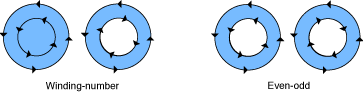
关于Fillling a Path,更详细的官方说明,可以看这里。
实现b:
UIBezierPath *path = [UIBezierPath bezierPathWithRect:self.scanView.frame];
[path appendPath:[UIBezierPath bezierPathWithRect:self.view.frame]];

CAShapeLayer *shapeLayer = [CAShapeLayer new];
shapeLayer.frame = self.view.layer.frame;
shapeLayer.path = path.CGPath;
shapeLayer.fillRule = kCAFillRuleEvenOdd;

CALayer *maskLayer = [CALayer new];
maskLayer.frame = self.view.frame;
maskLayer.backgroundColor = [UIColor blackColor].CGColor;
maskLayer.opacity = 0.6;
[self.view.layer addSublayer:maskLayer];

maskLayer.mask = shapeLayer;
CALayer’s mask property:
@property(strong) CALayer *mask
An optional layer whose alpha channel is used to mask the layer’s content.
如果实现了mask这个属性,则只有被mask的部分会被绘制。